


Choosing retail software is one of the most important technology decisions a retailer makes. The wrong choice leaves you with disconnected systems, stock errors, and expensive integrations; the right one gives you a single, real-time view of every warehouse, outlet, and online channel. This guide explains what retail software is, which features matter most, how cloud and traditional systems compare, what it costs, and how to evaluate vendors before you buy.
What Is Retail Software?
Retail software must be able to meet the operational requirements of warehouses, outlets, and online businesses. It must also be cloud-enabled. To qualify as a complete solution, it must include the following modules:
- Warehouse Management System and Supply Chain
- POS and Outlet Management
- eCommerce
- Door Delivery
- Customer Relationship Management
- Reports and Analytics
Modern retail store management also calls for technologies such as AI, AR, and IoT, which are fast becoming part of everyday retail operations.
Why Do Retail Businesses Need Retail Software?
A single convenience store can be run without software, but only with great difficulty. Once a business operates a chain of outlets, software becomes essential. It gives real-time visibility into stock, sales, vendors, and supplies, and it is the only practical way to meet customer expectations for service, feedback, and satisfaction.
Retail software also delivers four other benefits that directly affect the bottom line: fewer manual errors in billing, stock entry, and reconciliation; accurate stock visibility across every warehouse and outlet; better operational efficiency through automation of routine tasks; and a solid foundation for business growth, so you can add outlets, channels, and products without adding complexity.
Types of Retail Software Every Retailer Should Know
A complete retail software solution may need more than one software implementation. In general, retailers buy different software products from different vendors:
- MDM, Inventory Management, and Financial Management – SAP, Oracle, or other ERPs
- POS – iVend, Lightspeed, etc.
- eCommerce – Shopify, Magento, etc.
- Customer Mobile Apps – Home-grown apps
- Customer Loyalty
- Promotions and Campaign Management
- Reports and Analytics
Traditionally, retailers bought each of these products from a different vendor and integrated them on their own. This approach is extremely expensive and time-consuming, and it is costly to maintain because each vendor follows a different release cycle.
Modern retailers need a specialized, unified cloud platform that is agile enough to keep up with changing business requirements. It must be a single platform rather than a collection of siloed applications.
12 Essential Features to Look for in Retail Software
The solution must be an omnichannel platform that meets the end-to-end requirements of a retail business. Look for the following features when evaluating retail software.
1. Master Data Management
Master data is the single source of truth for every product, price, and category. If it is wrong or duplicated across channels, every report and every sale is affected.
- Support for product matrix
- Support for multiple barcodes/EANs
- Auto product/SKU creation
- Support for category, sub-category, department, and sub-department
- Support for multiple prices and batches
- Price change tracking
2. Warehouse Management
Warehouse management keeps stock moving accurately from procurement to dispatch, so outlets and online orders are never short of fast-moving items.
- Demand forecasting
- Procurement
- Batch management
- Storage management
- Label printing
- Picklist and order fulfilment
3. POS and Outlet Management
The POS is where most revenue is captured, so it must be fast, flexible, and reliable even when the internet connection is not.
- Online and offline billing
- Support for B2B and B2C billing
- Support for GST and VAT
- Configurable discounts
- Batch and expiry management
- Stock verification
- Stock transfers
- Support for door delivery
- Support for customer loyalty
4. Promotions and Campaign Management
Promotions drive footfall and basket size. Look for a platform that lets you configure complex offers once and apply them across every channel.
- Support for complex discount rules
- Customer-category-specific promotions
- Location-specific promotions
- Online promotions
- Automatic publishing of campaigns on social media
- Automatic delivery of campaigns by email, SMS, and WhatsApp
5. eCommerce
Your online store should be just another sales channel on the same platform, sharing stock, prices, and promotions with your outlets.
- Real-time stock visibility
- Order routing to the nearest fulfilment centre
- Integration with logistics partners
- Customer behaviour tracking and loyalty
- Cross-selling and up-selling
- Configurable discounts
- Payment gateway integration
- Order management dashboard and controls
- Responsive website
- Customer feedback
6. Customer Shopping App
A branded mobile app gives customers a faster, more personal way to shop and keeps them engaged between store visits. It should offer the same core capabilities as your eCommerce site.
- Support for both Android and iOS
- Real-time stock visibility
- Payment gateway integration
- Customer behaviour tracking and loyalty
- Cross-selling and up-selling
- Order management dashboard
- All other eCommerce capabilities listed above
7. Customer Relationship and Loyalty
Knowing who your customers are, what they buy, and how they feel about your service is the foundation of repeat business.
- Customer visits
- Customer purchases
- Customer feedback, complaints, and resolution
- Loyalty cards
- Discount coupons
- Gift vouchers
- Memberships
- Subscriptions
- Sign-ups
- Referrals
- Customer notifications
8. Reports and Analytics
Reports turn daily transactions into decisions. They show which outlets, products, and campaigns perform, and where stock is stuck.
- Outlet health reports
- Sales reports (date-wise, counter-wise, category-wise, and brand-wise)
- Stock/inventory reports
- Ageing reports
- Stock liquidation and dead-stock reports
- Location-wise P&L report
- Campaign reports
9. Data Management
Retailers move large volumes of data in and out of their systems. Strong import, export, and recovery features protect the business from disruption and data loss.
- Bulk master data import/export
- Outlet transactional data import/export
- Warehouse transactional data import/export
- Support for multiple data formats
- Backup and recovery
- Real-time replication and disaster recovery
10. Access Control (Roles and User Management)
Role-based access ensures that staff see and do only what their job requires, which reduces errors and fraud.
- Custom role creation to match business requirements
- User and role management
- User activation/deactivation
- Shift-based access control
- Device-specific access control/licensing
11. Performance Requirements
Slow billing means long queues and lost sales, so performance targets should be measured during evaluation rather than assumed.
- Average response time: less than 2 seconds
- Scalability: must support 1 million transactions per day
- Support for distributed computing rather than reliance on a high-end server
12. Security Requirements
Retail systems handle payments and personal data, so security must be built into the platform rather than added later.
- End-to-end encryption (SSL/TLS enabled)
- Passwords with an expiry cycle
- Strong passwords with two-factor authentication
- Integration with company directory services
- Mandatory session expiry
- CAPTCHA to prevent bot traffic and server overload
- Cloud server firewalls
Cloud-Based vs. Traditional Retail Software
Cloud is the reality. It is no longer feasible to run traditional client/server software with a local server, LAN devices, and cabling at every outlet. The following reasons make the move to a cloud server inevitable.
| Feature | Cloud-Based | Client/Server |
|---|---|---|
| Cost of ownership | SaaS model, no heavy upfront investment | High upfront investment (CAPEX) |
| Implementation time | Typically 4–6 weeks | Typically 3–4 months |
| Maintenance | Included in the subscription | Around 15% of CAPEX |
| Release and deployment | Easy, handled centrally | Time-consuming, outlet by outlet |
| Access from anywhere | 24x7 | Local access only |
| Availability | 99.9% or higher | Often below 95% |
| Troubleshooting | Typically under 30 minutes | Typically 2 hours or more |
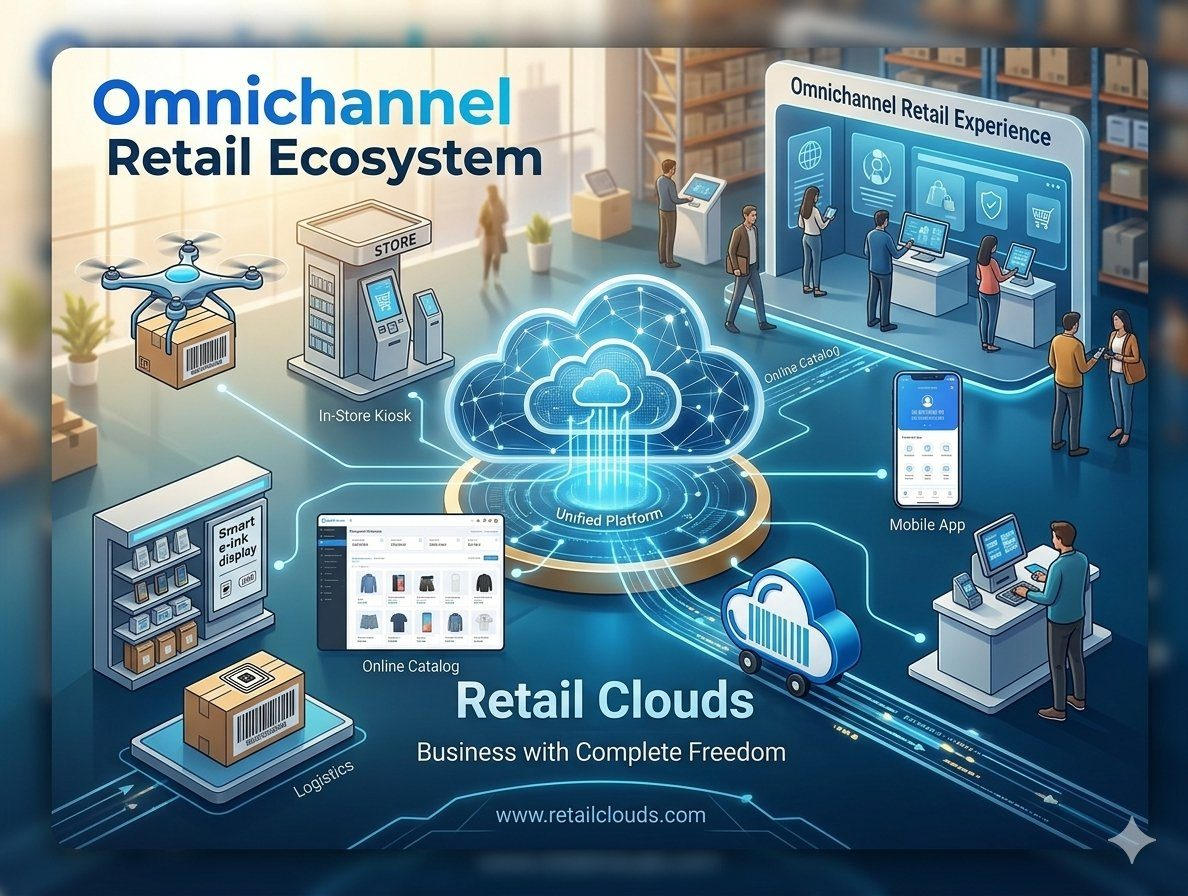
How Omnichannel Retail Software Connects Online and Offline Stores
Omnichannel retail software is not optional; it is a must for running a modern retail business. An omnichannel platform connects inventory and sales channels seamlessly.
Retail Clouds is a true omnichannel platform that offers a ready-to-use solution for warehouses, distribution centres, POS, eCommerce, marketplace integration, and other channels. Its unified design ensures that the customer experience stays the same regardless of the sales channel.
It delivers a unified data flow across all functions:
- Master Data – One master data control for all channels
- Order Management – Unified inventory and order fulfilment
- Promotions – One point of configuration and control
- Customer Loyalty – Consistent across all channels
- Inventory – Unified inventory access
- Customer Relationship – Available at every location, at all times
How Much Does Retail Software Cost?
Cloud retail software vendors operate on a SaaS model, so there is little or no upfront cost apart from training. Implementation is expected to be rapid and free of charge, unless specific customization is required. Typical pricing looks like this:
- Activation cost: typically USD 2,000 – USD 5,000
- Warehouses/outlets: typically USD 35–60 per user per month
- eCommerce: typically 8–12% of the order value
Pricing is negotiable, depending on the number of users and the volume of business. See Packages & Pricing for current plans.
How to Choose Retail Software for Your Business
Follow the checklist below before choosing a solution. We strongly recommend taking evaluation licenses so you can verify each feature yourself.
1. Functional Evaluation
- Prepare a business requirements document.
- Verify each functional requirement.
2. Performance Evaluation
- Verify the response time of the POS and other operations.
- Verify that the POS works offline.
- Verify scalability: the maximum number of transactions per day the software can handle.
- Verify availability: ask existing customers about the software's downtime.
3. Support and Maintenance Evaluation
- Support hours: verify that production support is available 24x7.
- Support during holidays
- Production issue (Level 1 ticket) – resolution time
- Production issue (Level 2 ticket) – resolution time
- Production issue (Level 3 ticket) – resolution time
- Feedback and releases
Why Consider Retail Clouds?
Retail Clouds is built to score strongly on all three counts that matter when you evaluate a platform:
- Functional depth – POS, warehouse, eCommerce, loyalty, and analytics on one unified platform
- Performance – a cloud-native design built for speed and scale
- Support and maintenance – 24/7 support from retail experts and continuous updates
We partnered with Retail Clouds at a critical point while building our technical capability, and it let us focus on our core business.
We invite you to activate an evaluation license. Our Customer Support Team will schedule a call and guide you through the setup. You can use it for four weeks and verify the software against the checklist you prepared.
Frequently Asked Questions
What is retail software?
Retail software is a platform that manages the day-to-day operations of a retail business, including warehouses, outlets, eCommerce, door delivery, customer relationships, and reporting. A modern solution runs on the cloud and gives you one real-time view of stock, sales, vendors, and customers.
Why do I need retail software if I only have a few stores?
A single store can run without software, but only with great difficulty. As soon as you add outlets, manual processes lead to stock errors, billing mistakes, and poor visibility. Retail software removes these problems and prepares your business to grow.
What is the difference between cloud-based and client/server retail software?
Cloud-based software runs on a SaaS model, so there is no heavy upfront investment, no local servers to maintain, and updates are applied for you. Client/server software needs a local server at each outlet, a high upfront investment (CAPEX), and ongoing maintenance costs. Cloud software also typically offers availability of 99.9% or higher, compared with below 95% for many client/server setups.
How long does implementation take?
A full cloud rollout typically takes 4–6 weeks, compared with 3–4 months for a traditional client/server system, and a basic eCommerce site can be ready in hours. Implementation is expected to be free of charge unless you need specific customization.
How much does retail software cost?
Retail Clouds uses a SaaS model with little or no upfront cost apart from training. Typical pricing is an activation cost of USD 2,000–5,000, a monthly fee of USD 35–60 per user for warehouses and outlets, and 8–12% of the order value for eCommerce. Pricing is negotiable based on the number of users and your business volume, and current plans are listed on the Packages and Pricing page.
Can the POS work without an internet connection?
It should. Offline billing is an essential POS feature, and you should verify it during your evaluation. Transactions made offline should sync automatically once the connection is restored.
What is omnichannel retail software?
Omnichannel retail software connects all your sales channels, such as stores, eCommerce, mobile apps, and marketplaces, on a single platform. It uses one master data set, one inventory, one promotions engine, and one loyalty program, so customers get the same experience on every channel.
How should I evaluate retail software before buying?
Prepare a business requirements document, then evaluate the software on three counts: functional depth, performance, and support and maintenance. Take an evaluation license and test every feature against your checklist, and ask existing customers about downtime and support quality.
Is my business data safe on a cloud platform?
A good retail cloud platform should provide end-to-end SSL/TLS encryption, password expiry, two-factor authentication, session expiry, cloud firewalls, and regular backups with real-time replication and disaster recovery. Always confirm these during your evaluation.
Can I try Retail Clouds before buying?
Yes. You can request an evaluation license and use it for four weeks. Our Customer Support Team will schedule a call, guide you through the setup, and help you verify the software against your own checklist.
Final Thoughts
Retail software is no longer just a billing tool. It is the platform that connects your warehouses, outlets, online store, and customers into one operation.
Start with a clear requirements document, choose a unified cloud platform instead of a patchwork of separate products, and test performance, offline billing, and support with an evaluation license before you commit. Retailers who follow this approach avoid costly rework and are ready to add new outlets and channels as they grow.